
Stylin is our own app, so read this list with that in mind. Stylin is our pick: a free iOS app with an optional paid plan that styles the clothes you already own, shows each outfit on your body shape, and drops a fresh set of curated looks every week. The strongest alternative is Alta, which has far more App Store ratings, shows outfits on a personalised avatar and runs on iOS, Android and the web. We looked at the leading AI stylist and wardrobe apps on four things: how well the AI styles outfits, whether it works with your existing wardrobe, how personal the recommendations feel, and how useful it is for free.
This is an opinionated ranking. Every app below is a real product with real strengths, and we link out to each one so you can judge for yourself. We put Stylin first for reasons we explain below, judge every app on the same criteria, list Stylin’s own limitations, and say where each alternative is the better pick, because for some readers it will be. No app paid to be listed, and we earn no commission from the other apps here.
What is an AI stylist app? An AI stylist app is a phone app that uses artificial intelligence to suggest complete outfits for you. The best ones work from the clothes you already own, your body shape, your colouring, the occasion and the weather, rather than showing you generic trend photos. Most also suggest what to buy to fill gaps in your wardrobe.
Four criteria, weighted toward everyday usefulness: (1) Styling intelligence — does it produce outfits you would actually wear? (2) Wardrobe integration — does it style clothes you already own, not just a catalogue? (3) Personalisation — body shape, colour, occasion, budget. (4) Value — how much you get for free. The order is our editorial judgement across those four criteria, based on each app’s App Store listing, website and public reviews. It is not the result of a measured test, so treat it as an opinion and try the apps that interest you.
Prices and App Store ratings were checked on 31 October 2026 (all ratings are from the US App Store), and Android availability on Google Play the same day. Screenshots of other apps come from their official App Store listings; Stylin’s is from the app itself.
Quick answer: the best AI stylist apps at a glance
- Stylin — Our pick, and our own app. Styles your existing wardrobe on your body shape, with weekly outfit drops and 250+ brands; free on iOS with an optional paid plan.
- Alta — Best for virtual try-on. Outfits on a personalised avatar, weather- and schedule-aware, free on iOS, Android and web.
- Acloset — Best free all-rounder. AI cataloguing and daily weather-aware outfits, free up to 100 items.
- Whering — Best for sustainability. Cost-per-wear tracking and outfit planning, free with optional in-app purchases.
- Indyx — Best for wardrobe analytics. AI auto-tagging and a detailed wardrobe dashboard.
- Style DNA — Best for colour analysis. Seasonal colour type plus shape-aware daily looks.
- Dressly — Best for outfit scoring. Colour analysis and a score for every outfit, on a paid subscription.
- Cladwell — Best for seasonal capsules. Builds a season’s capsule mostly from clothes you own; outfits need a subscription.
| # | App | Platform | Price | App Store rating | Best for | Biggest limitation |
|---|---|---|---|---|---|---|
| 1 | Stylin | iOS | Free; optional Stylin+ plan ($49.99/yr on the App Store) | 4.4 (9) | styling the clothes you already own, on your body shape | iOS only; very few ratings so far; free tier allows 10 wardrobe photo uploads a week |
| 2 | Alta | iOS, Android, web | Free (no in-app purchases listed) | 4.9 (17,983) | seeing outfits on a personalised avatar | looks are shown on an avatar, not your own photo |
| 3 | Acloset | iOS, Android | Free up to 100 items; paid plans from $3.99/mo | 4.5 (5,500) | a broad feature set at a low price | free tier capped at 100 items |
| 4 | Whering | iOS, Android | Free; optional in-app purchases | 4.7 (12,024) | conscious wardrobes and cost-per-wear | built more for organising than AI styling; Outfit Maker is a paid extra |
| 5 | Indyx | iOS, Android | Free; Insider membership $12.99/mo | 4.8 (1,647) | people who want their wardrobe perfectly catalogued and tracked | more wardrobe tracker than active stylist |
| 6 | Style DNA | iOS, Android | Free tier; paid upgrades | 4.3 (7,529) | colour-analysis-driven styling | fuller feature set needs a paid plan |
| 7 | Dressly | iOS, Android | Subscription: $11.99/week, $34.99/mo or $79.99/yr | 4.4 (32,921) | colour analysis and a score for every outfit | weekly-priced subscription; reviews flag billing and cancellation issues |
| 8 | Cladwell | iOS, Android, web | Free closet; outfits need a subscription | 4.2 (1,037) | building a seasonal capsule from clothes you own | outfits, photo try-on and the stylist all need a subscription |
1. Stylin — our pick, and our own app
Platform: iOS · Price: Free; optional Stylin+ plan · Best for: styling the clothes you already own, on your body shape.
App Store rating: 4.4 (9), US store; 5.0 (10), UK store
Stylin starts from styling. You photograph your wardrobe, the app catalogues it, and it then assembles complete outfits from the pieces you own and shows those looks on your body shape, so you can see whether a combination works for you before you wear it.
Two things set it apart from most of this list. First, the weekly outfit drops: an editorial set of styled looks, refreshed every week. Second, when there is a genuine gap in your wardrobe, Stylin fills it with shopping picks tuned to your style, body type and budget, drawing on 250+ connected fashion brands. The core app is free on iOS; an optional paid plan, Stylin+, raises the wardrobe photo limit from 10 to 200 uploads a week and adds Make your own edit.
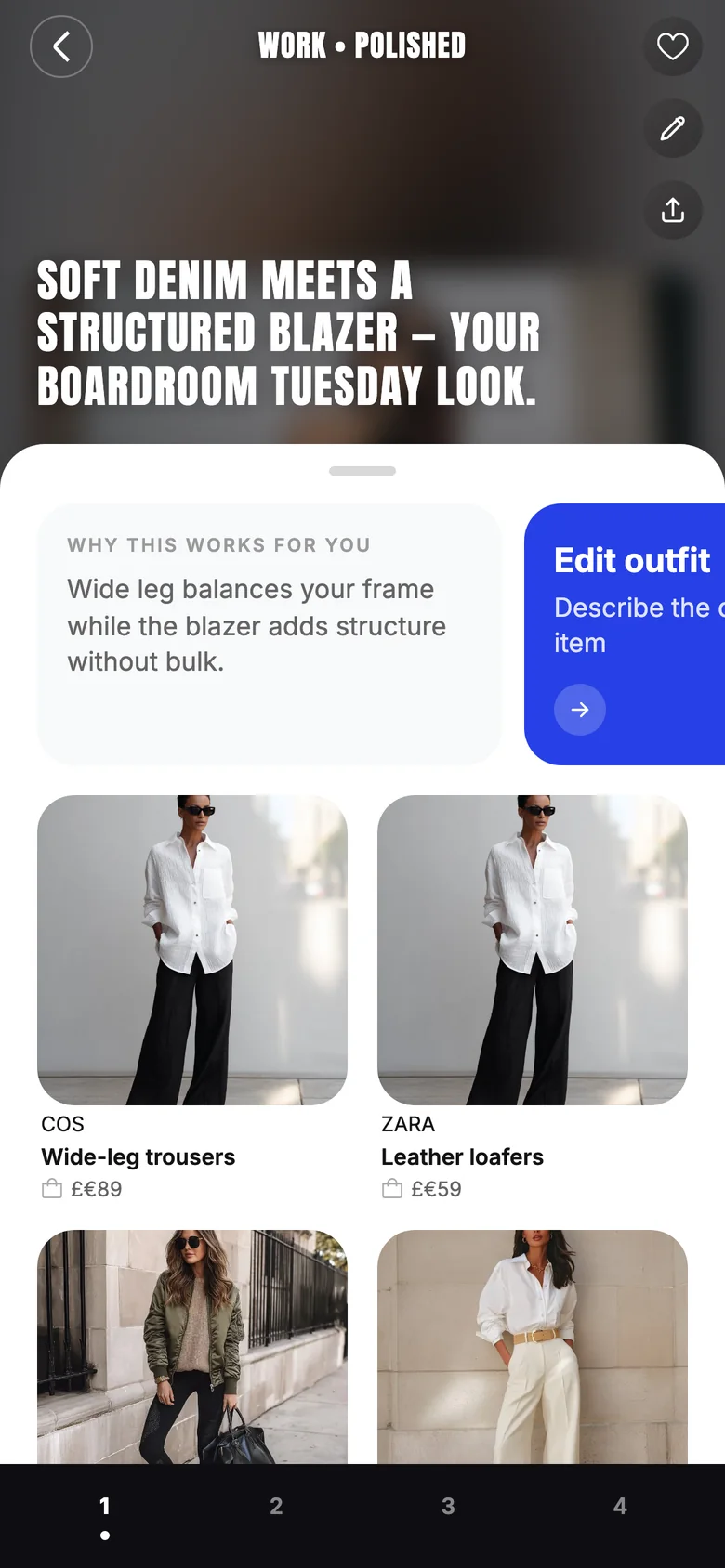
Pros: styles clothes you already own; outfits shown on your body shape; explains why each look works; weekly curated drops keep it fresh; shopping picks matched to style, body type and budget across 250+ brands; free core app.
Cons: iOS only — no Android or web app yet; a young app with very few ratings (4.4 from 9 on the US App Store, 5.0 from 10 on the UK store), so it has far less track record than Alta or Whering; the free tier allows 10 wardrobe photo uploads a week; no avatar try-on like Alta’s.
Why we put it first: it combines styling your existing wardrobe, looks shown on your body shape, a weekly editorial refresh, and budget-aware shopping across 250+ brands in one app. That is our judgement of our own product, so weigh it accordingly: Style DNA and Cladwell cover parts of that mix too, and Alta has a far longer track record. If you are on Android, or you want to see looks on an avatar of yourself, Alta is the stronger pick today.
2. Alta — best for virtual try-on
Platform: iOS, Android, web · Price: Free (no in-app purchases listed) · Best for: seeing outfits on a personalised avatar.
App Store rating: 4.9 (17,983), US store
Alta is the most established AI stylist app in this list, with 4.9 stars from nearly 18,000 US App Store ratings and press coverage from Vogue, Elle and Forbes. You build a digital closet from photos or forwarded email receipts (with automatic background removal and tagging), and Alta generates outfits around the weather, your schedule and the occasion. Its signature feature is virtual try-on on a personalised avatar: you see each look on a model built to resemble you. It also plans trips and packing lists, tracks cost-per-wear, and keeps a wishlist with sale alerts.
Alta is free to use, and its App Store listing shows no in-app purchases as of October 2026. It runs on iOS, Android and the web.
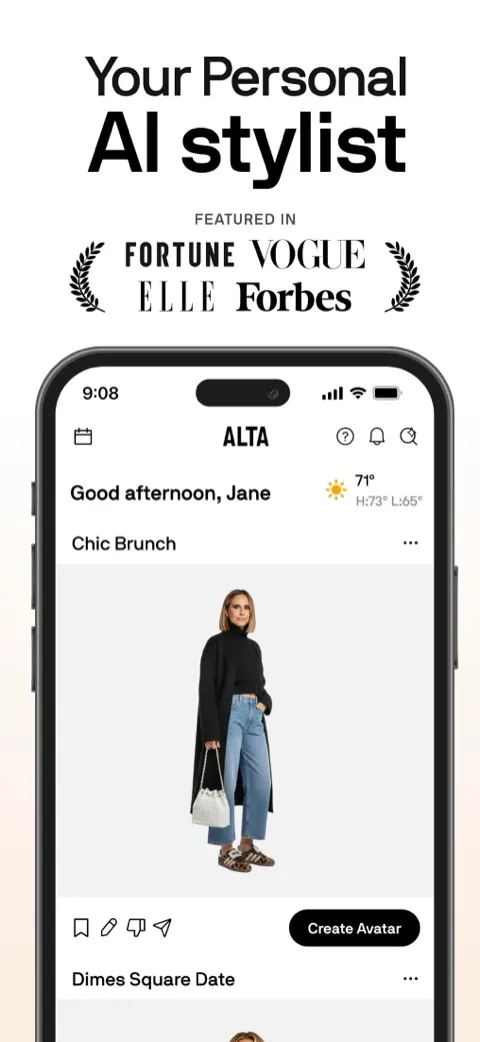
Pros: virtual try-on on a personalised avatar; weather-, schedule- and occasion-aware outfits; receipt import; trip planning; free; iOS, Android and web; a large number of high App Store ratings.
Cons: looks are shown on an avatar rather than your own photo; the wishlist and sale alerts pull it towards shopping; its long-term pricing is not published.
3. Acloset — best free all-rounder
Platform: iOS, Android · Price: Free up to 100 items; paid plans from $3.99/mo · Best for: a broad feature set at a low price.
App Store rating: 4.5 (5,500), US store
Acloset is an AI fashion assistant. Its AI organises your clothes from a single photo, detects individual items from a mirror selfie, and turns casual snaps into clean product-style images. It gives daily outfit suggestions tuned to the weather and your calendar, adds colour analysis, and lets you ask its AI stylist fashion questions.
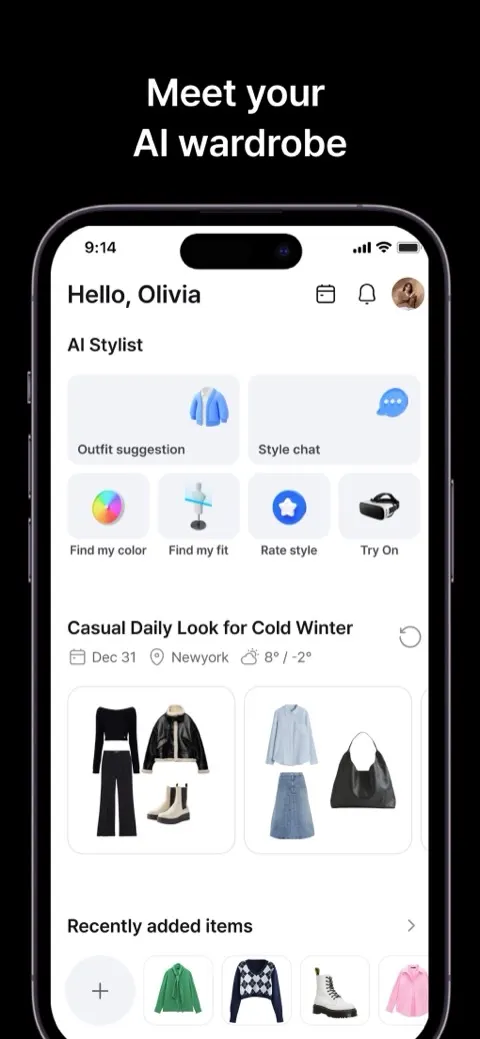
Pros: auto-cataloguing from photos; weather- and calendar-aware daily outfits; colour analysis; cross-platform (iOS and Android); low entry price.
Cons: the free tier caps you at 100 items; body-shape rendering is not its focus.
4. Whering — best for sustainable style
Platform: iOS, Android · Price: Free; optional in-app purchases · Best for: conscious wardrobes and cost-per-wear.
App Store rating: 4.7 (12,024), US store
Whering is a free closet and styling app with a strong sustainability angle. You add your own photos with automatic background removal, track cost-per-wear, shuffle your closet into outfits with its Dress Me feature, and plan outfits and packing. Its App Store listing calls it the largest free social styling and closet app, with 9M+ users.
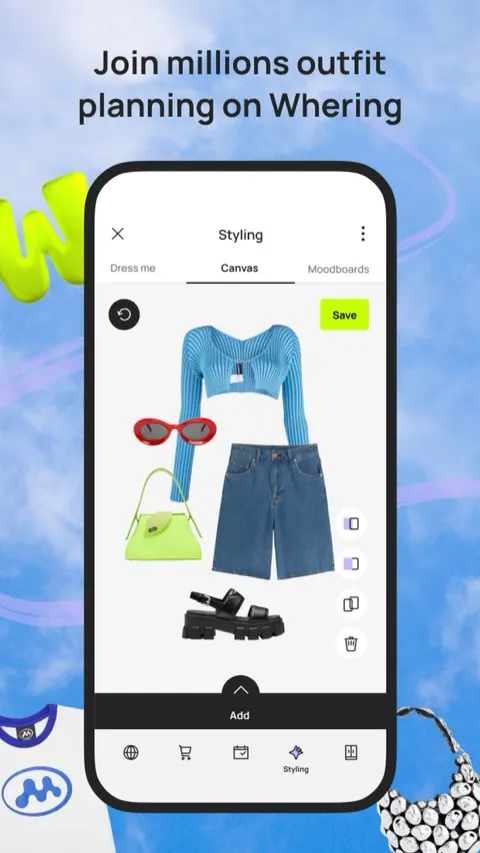
Pros: free to catalogue and style your closet; cost-per-wear tracking; big community; iOS and Android.
Cons: built more for organising than AI styling; the Outfit Maker is sold as a paid extra.
5. Indyx — best for wardrobe analytics
Platform: iOS, Android · Price: Free; Insider membership $12.99/mo · Best for: people who want their wardrobe perfectly catalogued and tracked.
App Store rating: 4.8 (1,647), US store
Indyx combines AI auto-tagging with a receipt feature that adds new purchases when you forward an email confirmation. Its focus is analytics: cost-per-wear and a wardrobe dashboard with interactive charts of what you own and wear. It also transforms your photos into clean editorial flatlays.
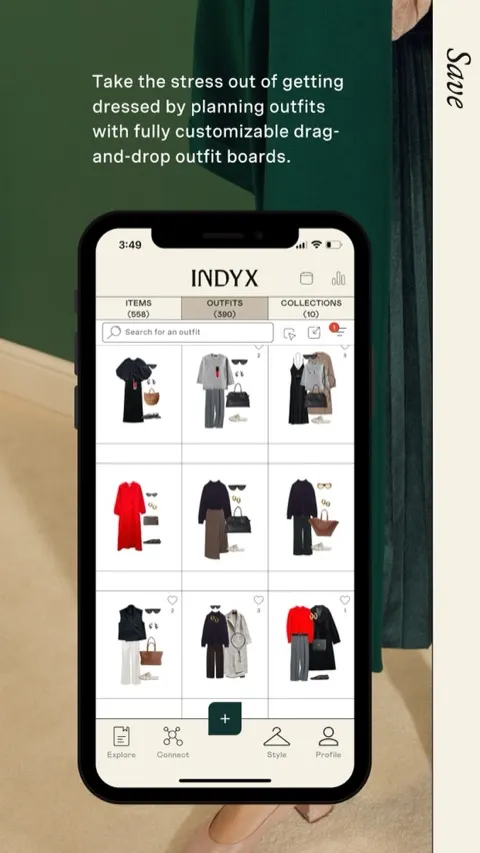
Pros: AI auto-tagging; receipt forwarding; detailed ownership analytics; polished flatlay visuals.
Cons: advanced analytics sit behind the Insider membership ($12.99/mo or $74.99/yr) and human-stylist sessions are paid separately; more of a wardrobe tracker than an active stylist.
6. Style DNA — best for colour-and-shape analysis
Platform: iOS, Android · Price: Free tier; paid upgrades · Best for: colour-analysis-driven styling.
App Store rating: 4.3 (7,529), US store
Style DNA analyses a selfie to give you a seasonal colour type, then serves daily outfits matched to your palette and body shape. If your main question is "which colours and shapes actually suit me?", it is a focused, useful answer.
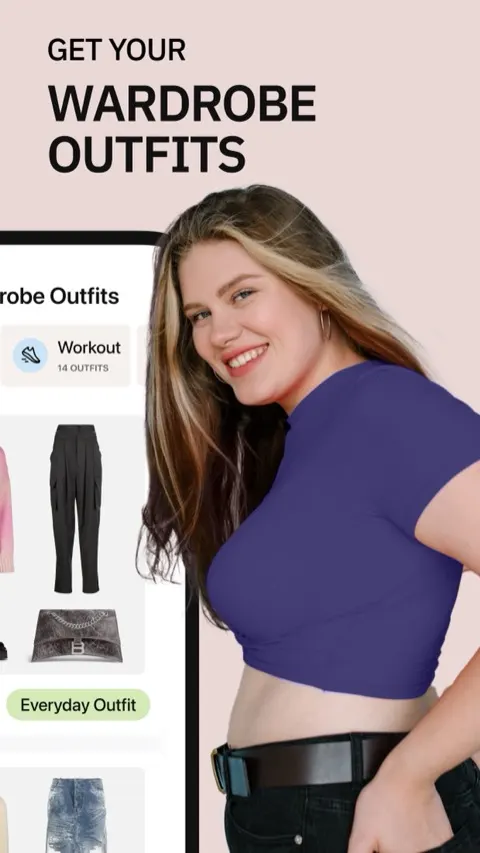
Pros: personal colour analysis from a selfie; considers body shape; daily outfits from your own closet.
Cons: the fuller feature set needs a paid plan.
7. Dressly — best for outfit scoring
Platform: iOS, Android · Price: Subscription: $11.99/week, $34.99/mo or $79.99/yr · Best for: colour analysis and a score for every outfit.
App Store rating: 4.4 (32,921), US store
Dressly is one of the most-rated apps in the category, with nearly 33,000 US App Store ratings. It starts with a selfie-based colour analysis, then scores outfits on style, fit and colour harmony, suggests capsule-wardrobe combinations, and recommends pieces from retailers you like, with virtual try-on on top. If you want a verdict on whether an outfit works, Dressly gives you one as a number.
The core features sit behind a subscription listed at $11.99 a week, $34.99 a month or $79.99 a year on the App Store in October 2026, and recurring billing and cancellation are a common theme in its App Store reviews.
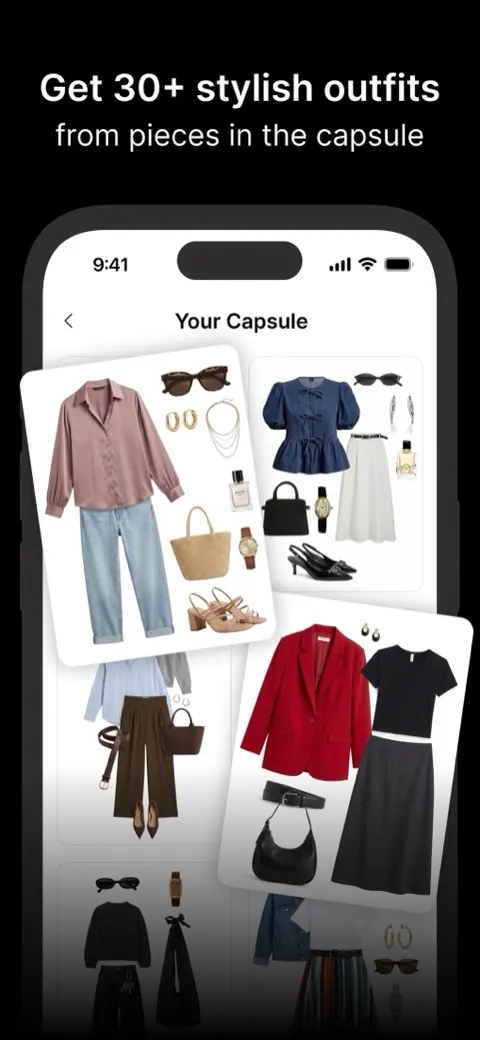
Pros: colour analysis from a selfie; a score for every outfit; capsule-wardrobe combinations; virtual try-on; iOS and Android.
Cons: weekly-priced subscription that adds up quickly; reviews flag billing and cancellation friction; more shopping-led than styling what you own.
8. Cladwell — best for seasonal capsule wardrobes
Platform: iOS, Android, web · Price: Free closet; outfits need a subscription · Best for: building a seasonal capsule from clothes you own.
App Store rating: 4.2 (1,037), US store
Cladwell builds a capsule wardrobe for the season: about 33 pieces, mostly ones you already own, according to its App Store listing. Each day it suggests outfits from your closet with a note on why they work, can show them on a photo of you, and turns missing capsule pieces into a shopping list. Building and organising your closet is free; outfits, the photo try-on, colour analysis and the stylist need a subscription.
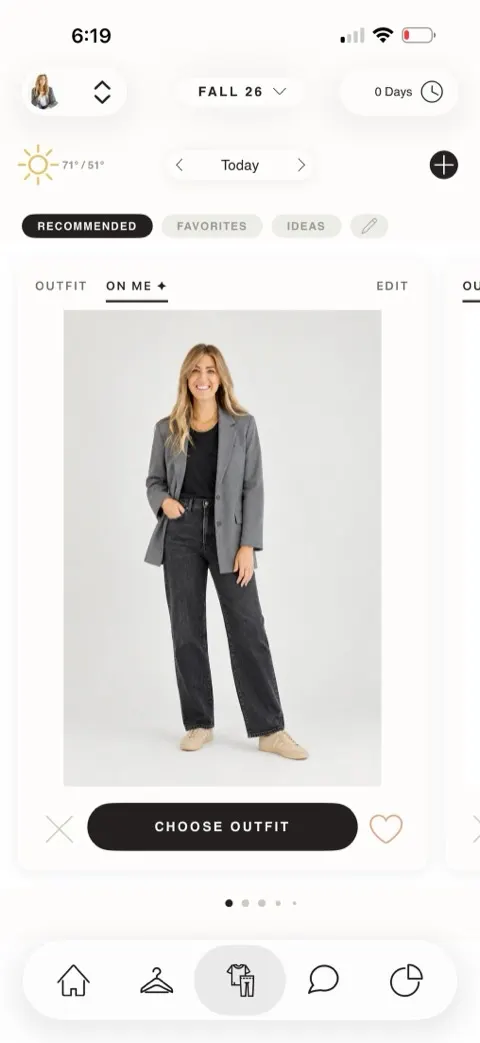
Pros: a seasonal capsule built mostly from clothes you own; daily outfits with a note on why each works; outfits shown on your own photo.
Cons: only building and organising your closet is free; outfits, try-on and the stylist all need a subscription.
How to choose the right AI stylist app for you
The best AI stylist app depends on what you actually want it to do:
- You want a stylist that dresses the clothes you own, on your body shape, for free: choose Stylin (iOS).
- You want to see outfits on an avatar of yourself, or you are on Android or the web: choose Alta.
- You are on Android and want the best free all-rounder: choose Alta, Acloset or Whering.
- You care most about analytics and cost-per-wear: choose Indyx or Whering.
- You want to know which colours suit you: choose Style DNA, or Dressly if you also want every outfit scored and do not mind a subscription (or read our colour analysis guide).
- You are building a capsule wardrobe from scratch: choose Cladwell.
Which app suits your situation
The list above sorts by what each app does best. It is often more useful to start from your own situation instead:
- Busy professionals who need outfits decided fast: the deciding factor is how quickly the app produces a complete, wearable look without input from you. Stylin builds full outfits from the clothes already catalogued in your wardrobe, and Alta plans outfits around your calendar and the weather; Cladwell is the alternative if you would rather reduce the number of decisions by working from a smaller capsule.
- People who dislike shopping: look for an app that maximises what you already own before it recommends anything new. Stylin and Indyx both work this way — Stylin by restyling your existing pieces into new combinations, Indyx by showing cost-per-wear so you can see which items are already earning their place. Avoid apps whose main function is a shopping feed, since they solve the opposite problem.
- Seasonal wardrobe refreshes: the job here is working out what you have, what still fits the season, and what is genuinely missing. Whering and Indyx focus on the inventory and analytics side of that question, and Cladwell builds a capsule for the season. Stylin helps once you want to see the season's pieces styled into outfits on your own shape.
AI stylist app vs personal stylist app: what's the difference?
An AI stylist app uses software to build outfits for you, usually from photos of clothes you already own, in seconds and often for free. A personal stylist app connects you with a human stylist who chooses clothes for you, which is slower, paid, and usually centred on buying new pieces.
- Human-stylist services: Stitch Fix is the best-known example in the US. You complete a style quiz, a stylist sends a box of pieces, and a $20 styling fee is credited against anything you keep. Indyx also sells sessions with human stylists who work from your catalogued wardrobe. The strength is human judgement; the trade-offs are cost, waiting time and, with box services, a focus on new purchases.
- AI stylist apps: Stylin, Alta, Acloset, Style DNA and the rest of this list answer instantly, any morning, and most start from your existing wardrobe.
If you want someone to shop for you, a human-stylist service makes sense. If you want to get more out of the clothes you already own, an AI stylist app is the better fit, and far cheaper.
Which AI stylist apps are free?
Stylin, Alta and Whering are free for their core features; the other apps on this list are free to download but keep some or most features behind a paid tier. Here is what the free version of each gets you (checked 31 October 2026):
- Stylin (iOS): free without entering card details. Wardrobe cataloguing (up to 10 photo uploads a week), outfit building from your own clothes, body-shape personalisation and shopping picks are in the free tier; the optional Stylin+ plan raises the limit to 200 uploads a week and adds Make your own edit. More on what is free.
- Alta (iOS, Android, web): free to use, and its App Store listing shows no in-app purchases.
- Whering (iOS, Android): free to catalogue and style your wardrobe, with optional in-app purchases.
- Acloset (iOS, Android): free up to 100 items; paid plans from $3.99/month.
- Indyx (iOS, Android): free to use; the Insider membership ($12.99/month or $74.99/year) adds an advanced analytics dashboard, and human styling is paid separately.
- Style DNA (iOS, Android): free to download and use for the basics, with the fuller feature set in paid upgrades.
- Cladwell (iOS, Android, web): the free plan covers building and organising your closet; outfits, styling advice and colour analysis need a subscription.
- Dressly (iOS, Android): free to download, but its core features need a subscription — $11.99/week, $34.99/month or $79.99/year as listed on the App Store.
What features matter in an AI fashion stylist app
The features that matter are the ones that turn clothes you already own into outfits you would actually wear. Use this checklist when comparing apps:
- Styles your own wardrobe: it builds complete outfits from photos of your clothes, not just a shopping catalogue.
- Quick cataloguing: background removal and auto-tagging from a single photo, so setup takes an evening rather than a week.
- Body-shape awareness: outfits account for your proportions, ideally shown on your shape.
- Context: weather, occasion and calendar, so suggestions fit the day you are actually having.
- Fresh ideas: new combinations or curated drops, so you do not see the same five outfits on repeat.
- Gap-filling, not upselling: shopping picks only where your wardrobe has a genuine gap, within your budget.
- An honest free tier: know the item cap, ads and paywalls before you photograph 200 pieces.
- Runs on your phone: check iOS or Android support before you invest the setup time.
Which AI stylist apps work on Android?
Seven of the eight apps on this list work on Android: Alta, Acloset, Whering, Indyx, Style DNA, Dressly and Cladwell. Stylin is currently iOS-only.
If you want the best personal stylist app for Android, start with Alta for avatar try-on and a free plan, Acloset for a free all-rounder, or Whering for a free, sustainability-focused closet; choose Indyx if you want analytics or the option of a human stylist. Stylin has no Android build yet, but you can join the Android waitlist to hear when it ships.
Frequently asked questions
What is the best AI stylist app in 2026?
Stylin is our pick, and it is our own app. It catalogues the clothes you already own, builds complete outfits from them, and shows those looks on your body shape, free on iOS with an optional paid plan. Alta is the strongest alternative, especially on Android or if you want virtual try-on on an avatar; Acloset and Whering are strong free all-rounders; Indyx is best for wardrobe analytics.
Is there a free AI stylist app?
Yes. Stylin is free on iOS, with up to 10 wardrobe photo uploads a week and an optional paid plan, and Alta and Whering are free on iOS and Android. Acloset is free for up to 100 items, and Indyx is free with a paid membership for advanced analytics. Style DNA and Cladwell reserve their fuller features for paid tiers, and Dressly needs a subscription for its core features.
Which AI stylist app works with the clothes I already own?
Stylin, Alta, Acloset, Whering, Indyx, Style DNA and Cladwell all build a digital wardrobe from your own clothes; Dressly works from a capsule you set up. Stylin focuses on body shape, showing outfits on your shape and adding weekly editorial drops; Alta focuses on try-on, showing looks on a personalised avatar.
Can an AI stylist app tell me what to wear for my body shape?
Some can. Stylin matches outfits to your body shape as a core feature, and Style DNA factors body type into its recommendations. Alta and Cladwell show outfits on an avatar or your own photo, which helps you judge fit, but most other wardrobe apps focus on cataloguing and combinations without explicit body-shape matching.
Do AI stylist apps only suggest clothes I have to buy?
No. Many of them style what you already own first. Stylin builds looks from your existing wardrobe and only suggests shopping picks to fill genuine gaps, tailored to your style, body type and budget across 250+ brands. Apps such as Dressly lean more heavily on shopping recommendations.
What is the difference between an AI stylist app and a personal stylist app?
An AI stylist app builds outfits with software, usually from clothes you already own, instantly and often for free. A personal stylist service such as Stitch Fix pairs you with a human stylist who picks new clothes for you, for a fee.
Stylin is our own app. If a wardrobe-first stylist sounds right for you, it is free to try on iOS. If you are on Android or want avatar try-on, start with Alta.
