
Stylin is our own app, so read this list with that in mind. Stylin is our pick: a free iOS app with an optional paid plan that generates complete outfits from the clothes you already own and shows each look on your body shape. The strongest alternative is Alta, which has far more App Store ratings, generates outfits around your weather and schedule and shows them on a personalised avatar, on iOS, Android and the web. We looked at the leading outfit generator apps on outfit quality, whether they use your own clothes, personalisation, and value. If you want a feel for it before installing anything, try the outfit generator on the web: pick an occasion, mood and weather and see a sample look on the body shape you choose, with no sign-up.
This is an opinionated ranking with an outbound link to every app. We put Stylin first for a reason we explain below, judge every app on the same criteria, list Stylin’s own limitations, and say where each alternative is the better pick — on Android, for example, or if you prefer to build outfits by hand. No app paid to be listed, and we earn no commission from the other apps here.
Four criteria for a great outfit generator: (1) Outfit quality — are the generated looks actually wearable? (2) Your wardrobe — does it generate from clothes you own? (3) Personalisation — body shape, colour, occasion, weather. (4) Value — how much you get for free. The order is our editorial judgement across those four criteria, based on each app’s App Store listing, website and public reviews. It is not the result of a measured test, so treat it as an opinion and try the apps that interest you.
Prices and App Store ratings were checked on 31 October 2026 (all ratings are from the US App Store), and Android availability on Google Play the same day. Screenshots of other apps come from their official App Store listings; Stylin’s is from the app itself. Style DNA, Indyx, Pureple and Cladwell are covered in our AI stylist and wardrobe app rankings.
Quick answer: the best AI outfit generator apps at a glance
- Stylin — Our pick, and our own app. Generates outfits from clothes you own and shows them on your body shape, with weekly outfit drops; free on iOS with an optional paid plan.
- Alta — Best for outfits on an avatar. Weather- and schedule-aware outfits, free on iOS, Android and web.
- Acloset — Best free generator with weather and calendar awareness.
- Fits — Best for designing outfits yourself, with an AI stylist on hand.
- Whering — Best free, cross-platform closet with outfit shuffling and sustainability tools.
- Combyne — Best for creative outfits from brand catalogues and a big community.
- Dressly — Best for outfit scoring. Colour analysis and a score for every outfit, on a paid subscription.
- Stylebook — Best one-time-purchase outfit planner, if you are happy to build looks by hand.
| # | App | Platform | Price | App Store rating | Best for | Biggest limitation |
|---|---|---|---|---|---|---|
| 1 | Stylin | iOS | Free; optional Stylin+ plan ($49.99/yr on the App Store) | 4.4 (9) | wearable outfits generated from your own wardrobe, on your body shape | iOS only; very few ratings so far; free tier allows 10 wardrobe photo uploads a week |
| 2 | Alta | iOS, Android, web | Free (no in-app purchases listed) | 4.9 (17,983) | daily outfits shown on a personalised avatar | looks are shown on an avatar, not your own photo |
| 3 | Acloset | iOS, Android | Free up to 100 items; paid plans from $3.99/mo | 4.5 (5,500) | daily outfits tuned to weather and schedule | free tier capped at 100 items |
| 4 | Fits | iOS, Android | Free; Fits Pro and AI credit packs in-app | 4.6 (5,735) | building outfits on a canvas, with an AI stylist on hand | you assemble most looks yourself; AI styling draws on paid credits |
| 5 | Whering | iOS, Android | Free; optional credits and add-ons in-app | 4.7 (12,024) | free outfit shuffling with sustainability tracking | built more for organising than AI generation; Outfit Maker is a paid extra |
| 6 | Combyne | iOS, Android | Free; Combyne Premium in-app | 4.8 (87,786) | creative outfits from brand catalogues, shared with a community | styles catalogue items more than your own wardrobe |
| 7 | Dressly | iOS, Android | Subscription: $11.99/week, $34.99/mo or $79.99/yr | 4.4 (32,921) | colour analysis and a score for every outfit | weekly-priced subscription; reviews flag billing and cancellation issues |
| 8 | Stylebook | iPhone, iPad | One-time $4.99 | 4.7 (8,871) | planning outfits by hand, with no subscription | no AI outfit generation; last updated June 2025 |
1. Stylin — our pick, and our own app
Platform: iOS · Price: Free; optional Stylin+ plan · Best for: wearable outfits generated from your own wardrobe, on your body shape.
App Store rating: 4.4 (9), US store; 5.0 (10), UK store
Stylin generates outfits from the clothes you already own and shows each generated look on your body shape, so you can judge how an outfit reads on you rather than as two items side by side. You can also refine a look in plain language — “swap the t-shirt for a shirt” — and it is restyled around the change.
On top of one-off generation, Stylin delivers a weekly outfit drop: a fresh, editorial set of styled looks assembled from your wardrobe. When a look needs a piece you don’t own, it proposes shopping picks from 250+ connected fashion brands, tuned to your style, body type and budget. The core app is free on iOS; an optional paid plan, Stylin+, raises the wardrobe photo limit from 10 to 200 uploads a week and adds Make your own edit.
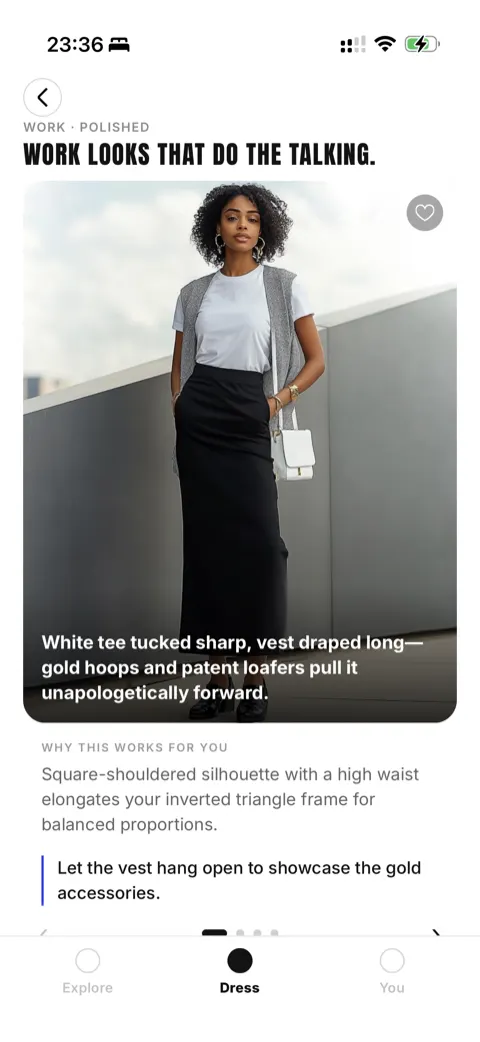
Pros: generates outfits from your own clothes; shows looks on your body shape; explains why each look works; edit a look in plain language; weekly curated drops; shopping picks matched to style, body type and budget across 250+ brands; free core app.
Cons: iOS only — no Android or web app yet; a young app with very few ratings (4.4 from 9 on the US App Store, 5.0 from 10 on the UK store), so it has far less track record than Alta, Combyne or Stylebook; the free tier allows 10 wardrobe photo uploads a week; no avatar try-on like Alta’s.
Why we put it first: the point of an outfit generator is to produce looks you will actually wear. Stylin generates from your existing wardrobe, shows the result on your body shape, and refreshes curated looks weekly. That is our judgement of our own product, so weigh it accordingly: Alta comes closest, with an avatar in place of your body shape and a far longer track record. If you are on Android, or you want to see looks on an avatar of yourself, Alta is the stronger pick today.
2. Alta — best for outfits on an avatar
Platform: iOS, Android, web · Price: Free (no in-app purchases listed) · Best for: daily outfits shown on a personalised avatar.
App Store rating: 4.9 (17,983), US store
Alta generates outfits from a digital closet you build from photos or forwarded email receipts, with automatic background removal and tagging. Its suggestions are planned around the weather, your schedule and the occasion, and each look is shown on a personalised avatar built to resemble you. With 4.9 stars from nearly 18,000 US App Store ratings, it is the most established AI-first outfit app in this list. It also plans trips and packing lists, and keeps a wishlist with sale alerts.
Alta is free to use, and its App Store listing shows no in-app purchases as of October 2026. It runs on iOS, Android and the web.
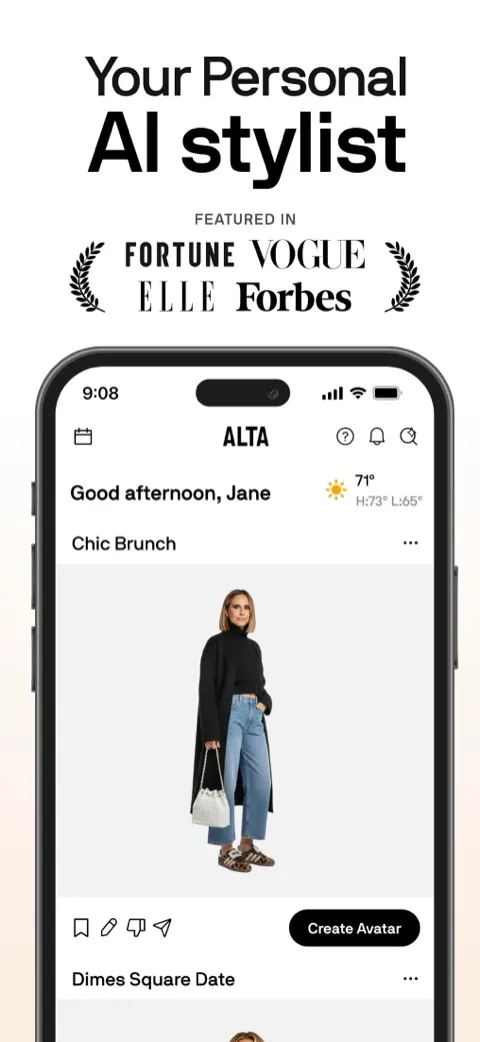
Pros: outfits shown on a personalised avatar; weather-, schedule- and occasion-aware generation; receipt import; trip planning; free; iOS, Android and web; a large number of high App Store ratings.
Cons: looks are shown on an avatar rather than your own photo; the wishlist and sale alerts pull it towards shopping; its long-term pricing is not published.
3. Acloset — best free generator with context awareness
Platform: iOS, Android · Price: Free up to 100 items; paid plans from $3.99/mo · Best for: daily outfits tuned to weather and schedule.
App Store rating: 4.5 (5,500), US store
Acloset generates daily outfit suggestions from your catalogued wardrobe, factoring in the weather and your calendar, and lets you ask its AI stylist for ideas. Its cataloguing — from a single photo, or several items detected in one mirror selfie — makes it quick to get to the generation stage, and it adds colour analysis on top. Paid plans run from Basic ($3.99/month or $27.99/year) to Expert ($24.99/month or $147.99/year).
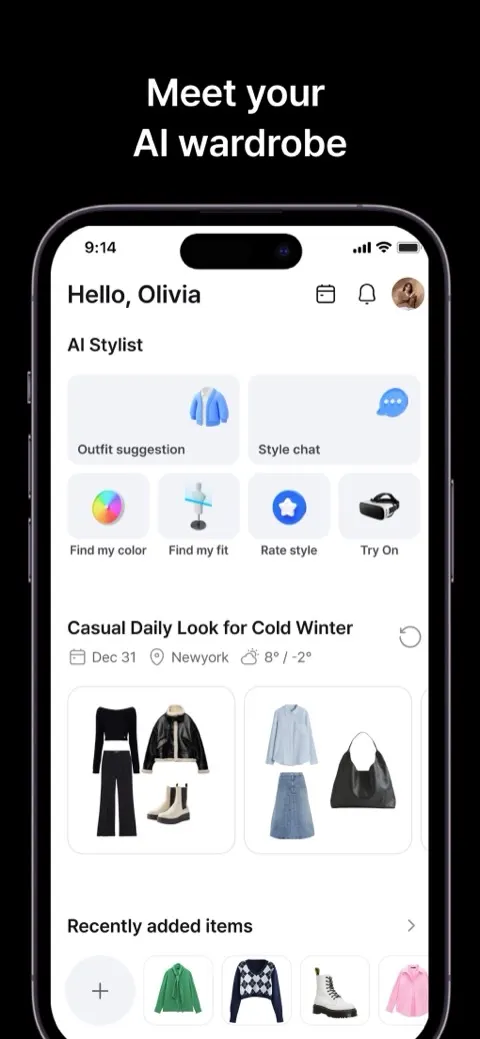
Pros: weather- and calendar-aware generation; auto-cataloguing; colour analysis; iOS and Android; low entry price.
Cons: the free tier caps you at 100 items.
4. Fits — best for designing outfits yourself
Platform: iOS, Android · Price: Free; Fits Pro and AI credit packs in-app · Best for: building outfits on a canvas, with an AI stylist on hand.
App Store rating: 4.6 (5,735), US store
Fits (Fits – Outfit Planner & Closet) is built around making outfits. You digitise your closet with automatic background removal and colour and brand detection, then build looks by placing pieces on a canvas or swiping through combinations. An AI stylist chat suggests outfits, a virtual try-on tool previews them, and there is an outfit calendar, mood boards and capsule building. The closet and outfit builder are free; Fits Pro and packs of AI credits are sold in-app.
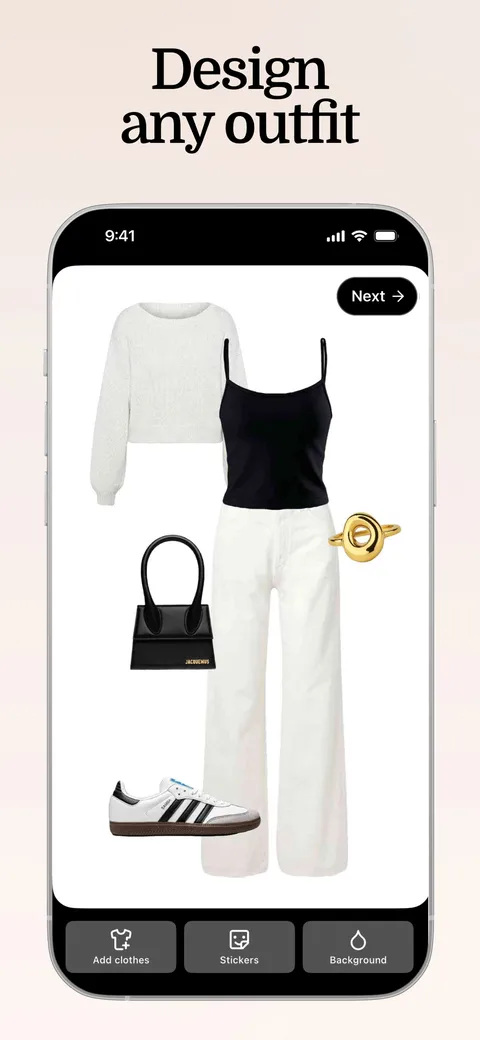
Pros: a flexible outfit canvas; AI stylist chat; virtual try-on; calendar, mood boards and capsules; free core app; iOS and Android.
Cons: you do more of the assembling yourself than in Stylin, Alta or Acloset; AI styling draws on Pro or paid credits.
5. Whering — best free, cross-platform closet with outfit shuffling
Platform: iOS, Android · Price: Free; optional credits and add-ons in-app · Best for: free outfit shuffling with sustainability tracking.
App Store rating: 4.7 (12,024), US store
Whering is a free closet and styling app. Its Dress Me feature shuffles your digital wardrobe into outfits, alongside background removal, cost-per-wear tracking, outfit planning and a big community. There is no subscription; its App Store listing sells optional credits, supporter tiers and an Outfit Maker purchase.
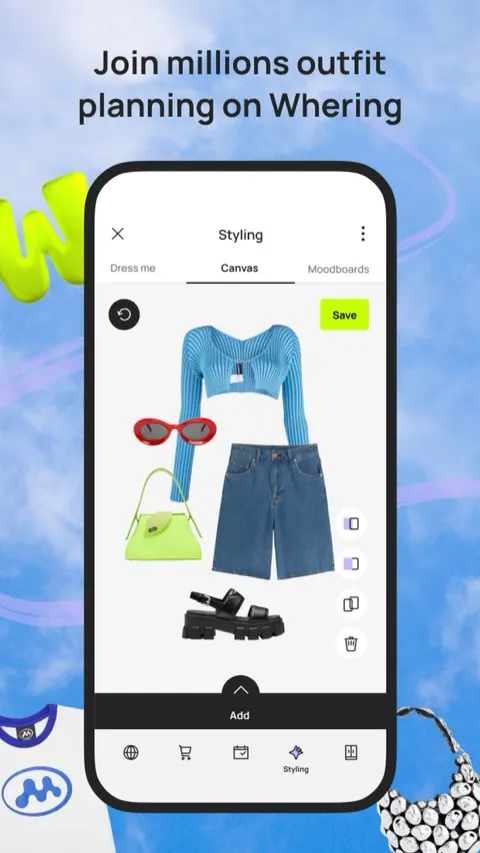
Pros: free to catalogue and style your closet; cost-per-wear tracking; large community; iOS and Android.
Cons: built more for organising than AI generation; the Outfit Maker is sold as a paid extra.
6. Combyne — best for creative, social outfit-building
Platform: iOS, Android · Price: Free; Combyne Premium in-app · Best for: creative outfits from brand catalogues, shared with a community.
App Store rating: 4.8 (87,786), US store
Combyne is the most-rated app in this list — 4.8 stars from more than 87,000 US App Store ratings. It blends outfit-building with a social feed: you combine pieces from a large catalogue of brand items (or add your own) on a canvas, share the result, and remix or comment on other people’s looks. It leans creative and collage-like rather than “here is what to wear today”, which some people love.
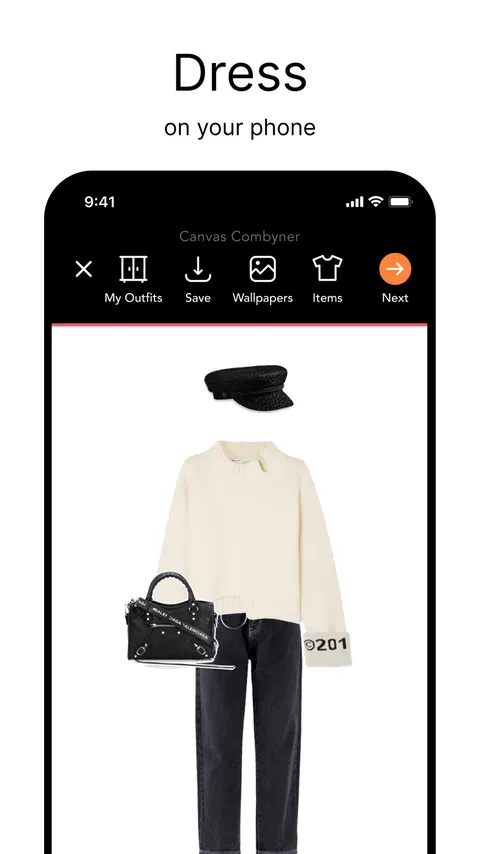
Pros: creative outfit-building; large brand catalogue to style with; active community; iOS and Android.
Cons: styles catalogue items more than your own wardrobe, so it is less useful for “what do I wear tomorrow”; its listing mentions no weather or calendar context.
7. Dressly — best for outfit scoring
Platform: iOS, Android · Price: Subscription: $11.99/week, $34.99/mo or $79.99/yr · Best for: colour analysis and a score for every outfit.
App Store rating: 4.4 (32,921), US store
Dressly (Dressly: AI Outfit Maker) is one of the most-rated apps in the category, with nearly 33,000 US App Store ratings. It starts with a selfie-based colour analysis, then scores outfits on style, fit and colour harmony, suggests capsule-wardrobe combinations, and recommends pieces from retailers you like, with virtual try-on on top. If you want a verdict on whether an outfit works, Dressly gives you one as a number.
The core features sit behind a subscription listed at $11.99 a week, $34.99 a month or $79.99 a year on the App Store in October 2026, and recurring billing and cancellation are a common theme in its App Store reviews.
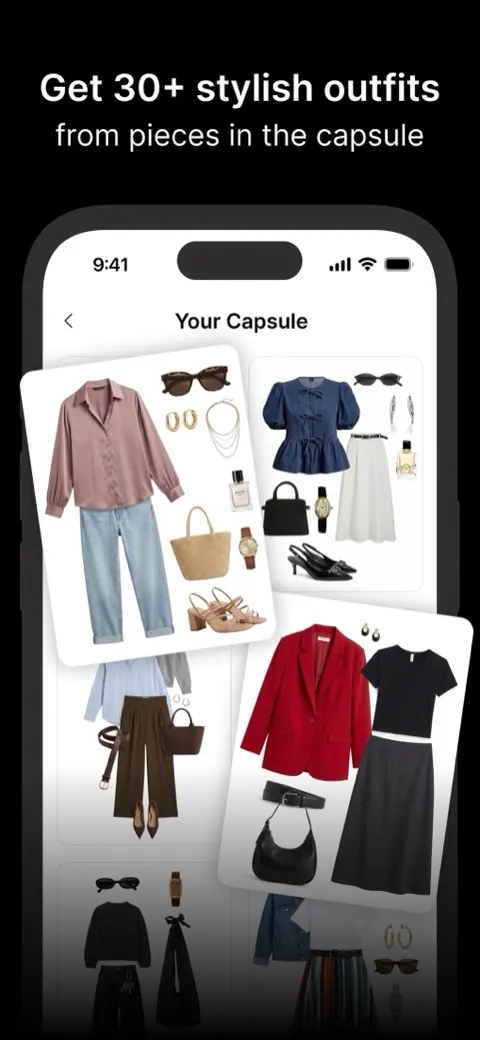
Pros: colour analysis from a selfie; a score for every outfit; capsule-wardrobe combinations; virtual try-on; iOS and Android.
Cons: weekly-priced subscription that adds up quickly; reviews flag billing and cancellation friction; more shopping-led than generating from what you own.
8. Stylebook — best one-time-purchase outfit planner
Platform: iPhone, iPad · Price: One-time $4.99 · Best for: planning outfits by hand, with no subscription.
App Store rating: 4.7 (8,871), US store
Stylebook is the veteran of the category, on the App Store since 2009. For a one-time $4.99 you get outfits built by hand on a canvas, an outfit calendar, packing lists and wear statistics, with iCloud backup. It does not generate outfits for you, though, and its last App Store update was in June 2025, so treat it as a manual planner rather than an AI generator.
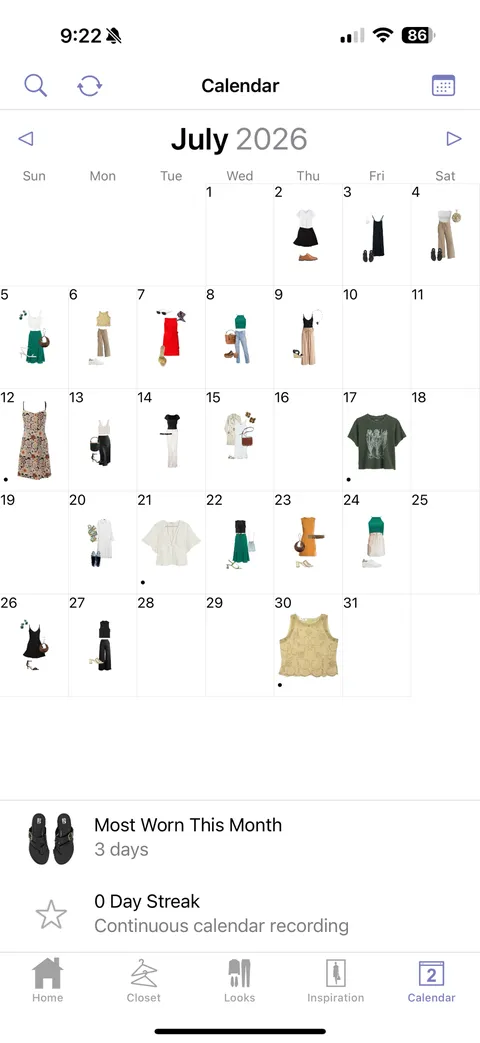
Pros: one-time price, no subscription; deep planning, calendar and wear statistics; long track record.
Cons: no AI outfit generation — you build every look yourself; no update since June 2025; iPhone and iPad only.
How to choose the right outfit generator
- You want wearable outfits from your own clothes, shown on your body shape, free on iOS: choose Stylin.
- You want to see outfits on an avatar of yourself, or you are on Android or the web: choose Alta.
- You want free, context-aware daily outfits on Android: choose Alta, Acloset or Whering.
- You enjoy designing outfits yourself and want AI as a helper: choose Fits, or Combyne if you want to style catalogue pieces and share them.
- You want every outfit scored and do not mind a subscription: choose Dressly.
- You hate subscriptions and are happy to plan by hand: choose Stylebook.
Outfit generator apps vs AI outfit image generators and try-on apps
Search for “AI outfit generator” and you will also find web tools such as CapCut, Krea and PhotoGrid that create a picture of an outfit from a text prompt, or swap the clothes in a photo. They are useful for mood boards and design ideas, but the clothes in the image are invented, so they cannot tell you what to wear tomorrow from your own wardrobe. Every app in our ranking does that job instead: it starts from clothes you own, or that you have added to a closet.
Virtual try-on apps sit in between. DLOOK (DLOOK: AI Outfit Stylist) lets you upload a photo and see yourself in garments from shops, and sells in-app subscriptions. If you are looking for apps like DLOOK, the closest in this list are Alta, which shows outfits on a personalised avatar, Dressly, which adds virtual try-on to outfit scoring, and Fits, which has a virtual try-on tool.
Frequently asked questions
What is the best AI outfit generator app in 2026?
Stylin is our pick, and it is our own app. It generates complete outfits from the clothes you already own and shows each look on your body shape, free on iOS with an optional paid plan. Alta is the strongest alternative, especially on Android or if you want outfits shown on an avatar; Acloset and Whering are strong free options, and Fits is best if you like building outfits yourself.
Is there a free AI outfit generator?
Yes. Stylin is free on iOS with an optional paid plan, and Alta is free on iOS, Android and the web. Whering is free with optional in-app purchases, Acloset is free for up to 100 items, and Fits and Combyne have free core apps. Dressly needs a subscription for its core features, and Stylebook is a one-time $4.99 purchase.
Can an AI generate outfits from my own clothes?
Yes. Stylin, Alta, Acloset, Fits and Whering all generate or suggest outfits from a digital wardrobe of your own clothes, and Stylebook lets you assemble them by hand. Combyne works mainly from brand catalogues, and Dressly from a capsule you set up. Stylin additionally shows those outfits on your body shape and refreshes curated looks weekly.
What is the difference between an outfit generator and a stylist app?
A generator combines items into looks, often by simple rules. A stylist app adds judgement — body shape, colour, occasion and taste.
Do AI outfit generators show the outfit on me?
A few do. Stylin shows generated outfits on your body shape, Alta shows them on a personalised avatar, and Dressly and Fits offer virtual try-on. Most of the others show flat-lays or collages, which makes it harder to judge a look before you wear it.
Stylin is our own app. If generating outfits from your real wardrobe sounds right for you, it is free to try on iOS. If you are on Android or want outfits on an avatar, start with Alta.
